
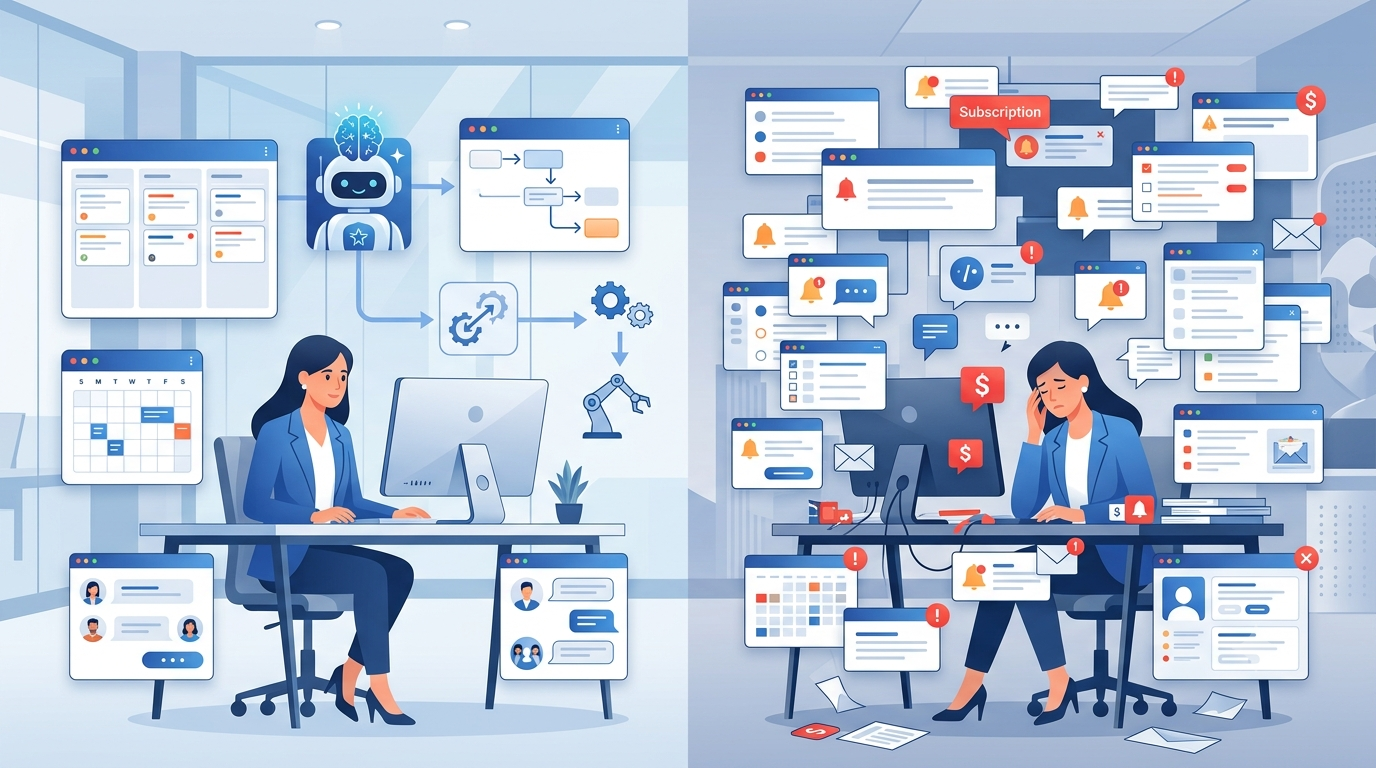
Technology has transformed the way we work, and AI Productivity Tools have become an essential part of modern businesses, freelancers, and students alike. From task managers and AI assistants to project management platforms and workflow automation software, these solutions promise to save time and improve efficiency. However, while these tools offer incredible advantages, they also come with hidden costs that many users fail to recognize.
Understanding these hidden challenges can help you choose the right tools, reduce distractions, and build a workflow that actually improves productivity instead of slowing you down.
The Rise of Modern Productivity Tools
The demand for modern productivity tools has exploded over the last few years. Businesses now rely on productivity software, AI assistants, collaboration platforms, and automation systems to manage projects and communicate with teams.
Popular categories include:
- AI writing assistants
- Project management tools
- Team collaboration software
- Time management tools
- Workflow automation platforms
- Cloud-based productivity apps
These solutions can undoubtedly improve efficiency—but only when they’re implemented wisely.
Tool Overload Is Becoming a Real Problem
One of the biggest mistakes professionals make is using too many productivity apps.
Many organizations use one application for messaging, another for meetings, another for documentation, another for project tracking, and several AI tools for content creation or automation.
Instead of improving productivity, constantly switching between multiple applications creates digital fatigue and reduces concentration.
The goal should always be workflow simplicity rather than collecting every trending software available.
Notifications Destroy Deep Focus
Most productivity software is designed to keep users updated in real time.
Unfortunately, endless notifications often become one of the biggest productivity killers.
Every email alert, message, task reminder, or calendar notification interrupts your concentration. Research shows that regaining focus after an interruption can take several minutes, making small distractions surprisingly expensive throughout the day.
Disabling unnecessary notifications and scheduling focused work sessions can significantly improve workplace efficiency.
Subscription Costs Add Up Quickly
Modern AI tools for productivity often operate on monthly or yearly subscriptions.
While one application may seem inexpensive, businesses frequently subscribe to multiple services, including:
- AI assistants
- Cloud storage
- Video conferencing software
- Team collaboration platforms
- Design software
- Automation tools
- Project management systems
Over time, these recurring expenses can become a substantial operational cost.
Before purchasing another subscription, ask whether your current software already offers similar functionality.
Learning New Software Takes Valuable Time
Every new platform introduces another learning curve.
Employees need time to understand interfaces, settings, integrations, and workflows before becoming productive.
Frequent software changes also require retraining entire teams, which temporarily reduces efficiency.
Instead of constantly replacing tools, businesses should focus on mastering the software they already use.
Automation Doesn’t Solve Every Problem
Automation has become one of the biggest selling points of AI Productivity Tools.
Automating repetitive work can save countless hours, but automating everything isn’t always beneficial.
Creative thinking, customer relationships, decision-making, and strategic planning still require human judgment.
The best workflows combine intelligent automation with human expertise rather than relying entirely on AI.
Data Privacy Matters More Than Ever
Most digital productivity platforms store important documents and company information in the cloud.
Before adopting any software, businesses should evaluate:
- Security standards
- Data encryption
- User permissions
- Privacy policies
- Backup options
- Regulatory compliance
Protecting business data should always be as important as improving productivity.
The Psychology of Feeling Productive
Modern dashboards, progress bars, and checklists create the feeling of constant achievement.
However, organizing tasks isn’t the same as completing meaningful work.
Many professionals spend hours customizing dashboards, color-coding projects, or experimenting with new tools instead of focusing on high-value activities.
True productivity comes from completing important work—not simply managing tasks.
How to Choose the Right Productivity Tools
Not every application deserves a place in your workflow.
Before adopting new software, ask yourself:
- Does this solve a real problem?
- Will it save more time than it takes to learn?
- Does it integrate with my current workflow?
- Is the subscription worth the long-term value?
- Can my existing software already do this?
Choosing fewer but better-integrated tools usually leads to higher productivity.
Best Practices for Smarter Digital Productivity
To get the most from your productivity system:
- Keep your software stack simple.
- Use only the features you actually need.
- Disable unnecessary notifications.
- Schedule distraction-free work sessions.
- Review subscriptions every few months.
- Invest in training before adopting new tools.
- Focus on outcomes instead of activity.
Small improvements in your workflow often create bigger results than constantly switching to the newest application.
Conclusion
There’s no doubt that AI Productivity Tools have transformed the modern workplace. They improve communication, automate repetitive work, and help individuals and businesses stay organized.
However, their hidden costs—including subscription fatigue, notification overload, software complexity, and digital distractions—can quietly reduce the very productivity they promise to improve.
The smartest professionals aren’t the ones using the most apps. They’re the ones using the right tools with clear purpose.
When technology supports your workflow instead of controlling it, productivity becomes simpler, more sustainable, and far more effective.
Frequently Asked Questions (FAQs)
Are AI productivity tools worth using?
Yes. The best AI productivity tools save time, automate repetitive tasks, and improve efficiency when used strategically.
What is the biggest hidden cost of productivity software?
The biggest hidden costs are distraction, subscription expenses, context switching, and the time required to learn new platforms.
How can I improve digital productivity?
Simplify your workflow, reduce unnecessary tools, disable distracting notifications, and focus on meaningful work instead of constantly organizing tasks.
Can too many productivity apps reduce efficiency?
Absolutely. Using too many productivity apps often leads to tool overload, lower focus, and reduced workflow efficiency.p users informed in real time. While instant updates are valuable, endless notifications can quickly become distractions.
Every message, reminder, email, or alert interrupts your workflow. Even brief interruptions require your brain to refocus, reducing efficiency over time.
Managing notification settings and scheduling dedicated focus periods can dramatically improve productivity.
Subscription Costs Add Up
Many productivity platforms operate on subscription-based pricing. A single app may seem affordable, but businesses often pay for multiple tools simultaneously.
Monthly expenses can include:
- Project management software
- Cloud storage
- Team communication platforms
- AI writing assistants
- Design tools
- Video conferencing software
- Automation platforms
For individuals and small businesses, these recurring costs can become a significant operational expense.
Learning New Software Takes Time
Every new application introduces a learning curve.
Employees must understand new interfaces, features, workflows, and integrations before they can benefit from the software. Frequent platform changes also require retraining, which reduces short-term productivity.
Before adopting another tool, it’s worth asking whether your current software can already accomplish the same task.
The Myth of Being Busy
Productivity tools often encourage users to organize everything—tasks, calendars, notes, reminders, labels, priorities, dashboards, and reports.
While organization is important, spending excessive time managing your productivity system can become a form of procrastination.
Checking off small tasks may feel productive, but real progress comes from completing meaningful work rather than simply maintaining an organized workspace.
Data Privacy and Security Concerns
Many cloud-based productivity platforms store business documents, conversations, customer information, and sensitive data online.
Organizations should carefully evaluate:
- Data encryption
- Privacy policies
- User permissions
- Backup options
- Compliance standards
Choosing trusted software providers and implementing strong security practices can reduce unnecessary risks.
Automation Isn’t Always the Answer
Automation saves time when used appropriately. However, automating every process without evaluating its necessity can create unnecessary complexity.
Businesses should automate repetitive tasks while preserving human decision-making where creativity, communication, and judgment matter most.
Technology should support people—not replace thoughtful work.
How to Use Productivity Tools More Effectively
Rather than collecting every trending application, focus on building a simple and efficient workflow.
Some practical strategies include:
- Audit the tools you currently use.
- Remove applications that duplicate existing functionality.
- Limit notifications to important updates.
- Schedule distraction-free focus sessions.
- Train teams thoroughly before introducing new software.
- Review subscription costs regularly.
- Choose tools that integrate well with each other.
The goal is to simplify work—not complicate it.
Finding the Right Balance
Modern productivity tools have transformed the way we work. They improve collaboration, automate repetitive tasks, and help teams stay organized. However, their hidden costs—including distractions, subscription expenses, learning curves, and digital overload—can reduce productivity if left unmanaged.
The most productive professionals aren’t necessarily the ones using the most software. They’re the ones who understand which tools truly add value and eliminate those that don’t.
Technology should make your work easier, clearer, and more efficient. When used intentionally, productivity tools become powerful assets. When overused, they can become obstacles to the very productivity they’re meant to improve.
By focusing on simplicity, thoughtful adoption, and intentional workflows, individuals and businesses can maximize the benefits of modern productivity tools while avoiding their hidden costs.